Legal case management software built for how attorneys actually work
EvidenceDesk case management software gives attorneys one place to open a matter, track its status, assign tasks, log deadlines and keep every note and file attached to the right case, accessible securely from any browser.

- Case management software
- Case management software is a system law firms use to organize each legal matter, including parties, deadlines, tasks, documents, communications and billing, so the whole team works from a single source of truth.
What you can do with EvidenceDesk case management
Matter dashboards
See status, next deadline, responsible attorney and open tasks for every case at a glance.
Tasks & workflows
Assign work, set due dates and reuse checklists for recurring matter types.
Practice-area templates
Start personal injury, family law, immigration or litigation matters with the right fields.
Team collaboration
Internal notes, mentions and activity history keep everyone aligned on a matter.
Conflict checks
Search contacts and past matters before taking on a new client.
Role-based access
Control who can view or edit each matter.
Why law firms move to dedicated legal case management software
Many firms start with spreadsheets, shared folders and email. That works until a matter changes hands, a deadline is stored in one person's inbox, or a client calls and nobody can see the latest status. Legal case management software solves this by giving every matter a single record that the whole team reads from and writes to.
With EvidenceDesk, the matter record is the center of the firm. Contacts, documents, evidence, tasks, calendar events, time entries and invoices all attach to it. An attorney opening a case sees the current stage, the next deadline, who is responsible and what is still open, without asking a colleague or searching several systems.
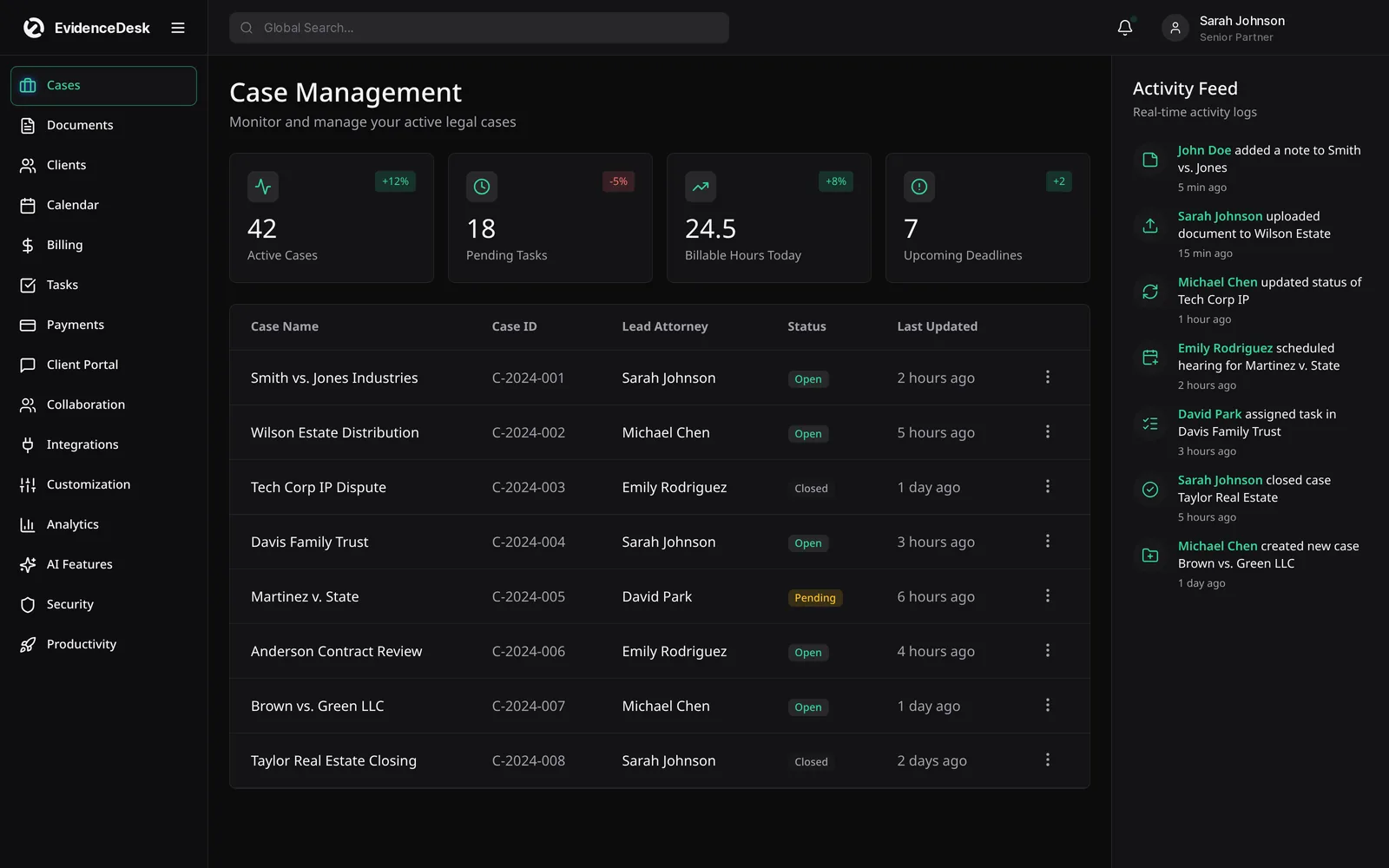
How attorney case management works in EvidenceDesk
Open the matter
Choose a practice-area template, add the client and opposing parties, and run a conflict check against existing contacts and past matters.
Plan the work
Apply a task checklist for the matter type, assign owners and due dates, and calendar court dates and limitation periods.
Work the file
Upload documents and evidence, log notes and calls, track time against tasks and keep internal discussion on the matter instead of in email.
Keep the client informed
Share selected documents and updates through the secure client portal.
Close and bill
Turn recorded time and expenses into an invoice, apply trust funds where appropriate and archive the matter with its full history intact.
Law office case management for every practice area
Different practices track different facts. Personal injury firms follow medical treatment, providers, liens and settlement stages. Family law firms need custody schedules and financial disclosures. Immigration practices manage forms and filing windows, while criminal defense teams log discovery and hearings. EvidenceDesk practice-area templates add the right fields and checklists for each, while keeping the same core matter record, so firms with several practice areas still work from one system. See solutions by practice area for details.
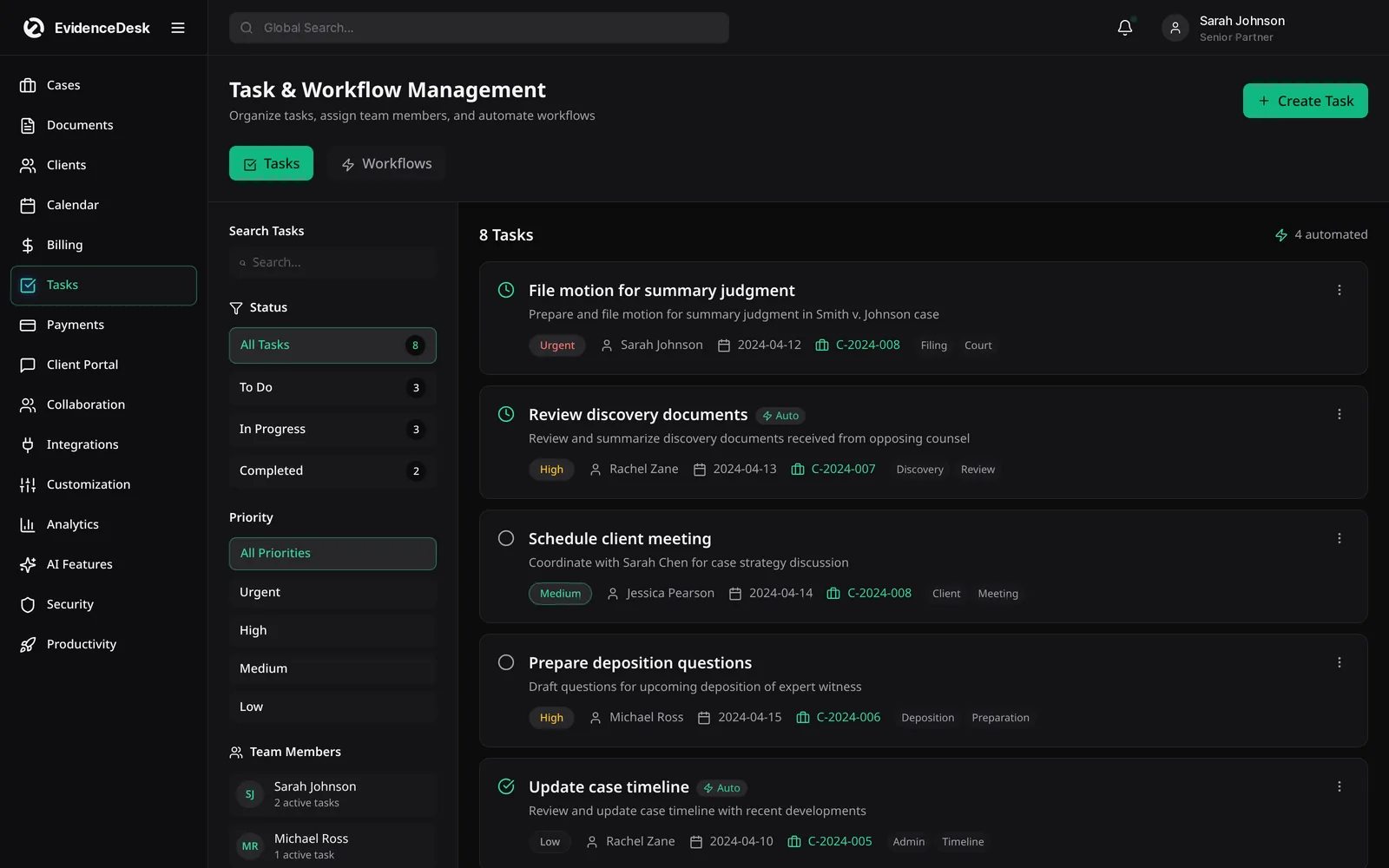
Cloud based legal case management software
EvidenceDesk is cloud-based: it runs in a web browser, so there is no server to buy or maintain and attorneys can reach their matters from the office, the courthouse or home. Access is controlled by role and by matter, and activity on matters and evidence is logged. Read more on the security page.
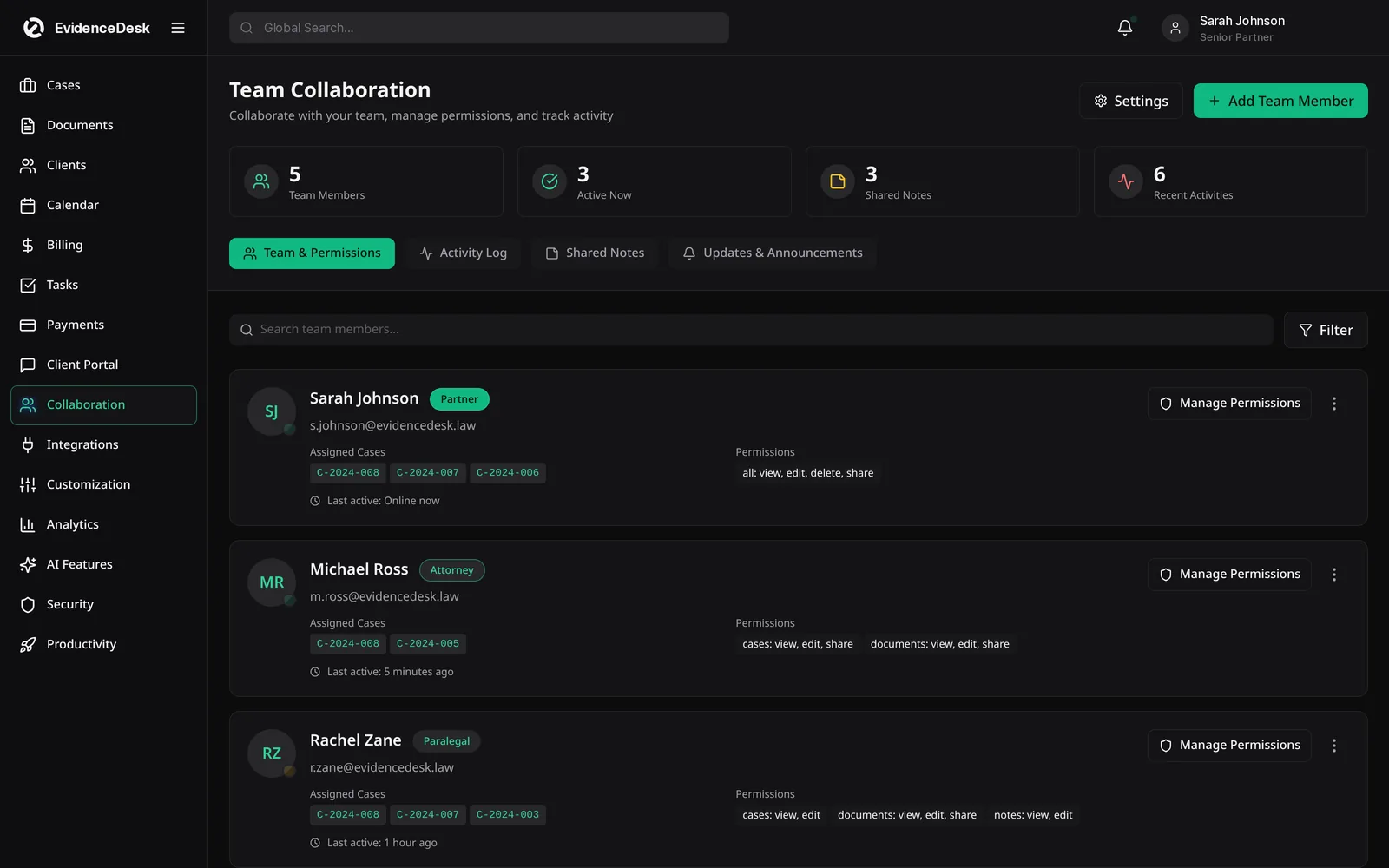
What to look for in law firm case management software
A matter record that connects documents, calendar, time and billing rather than separate modules that need re-entry.
Practice-area templates and reusable task checklists.
Conflict checking across contacts and past matters.
Role-based and matter-level permissions.
A client portal for secure sharing.
Clear data export, so the firm always owns its records.
Frequently asked questions
What is case management software?
Case management software organizes every legal matter, including deadlines, tasks, documents, contacts and communications, in one system so a firm can track work and avoid missed dates.
What is case management in law?
In law, case management is the process of planning, tracking and coordinating all work on a matter from intake to closing, including deadlines, filings, evidence and client communication.
Is EvidenceDesk cloud-based case management software?
Yes. EvidenceDesk runs in the browser, so attorneys and staff can access matters from the office, court or home without installing a server.
Does EvidenceDesk work for personal injury case management?
Yes. Matter templates let personal injury firms track incidents, medical records, providers, liens and settlement stages alongside general case data.
What is the difference between case management and practice management software?
Case management focuses on organizing individual matters: tasks, deadlines, documents and notes. Practice management software includes case management and adds firm-wide functions such as time tracking, billing, trust accounting, intake and reporting. EvidenceDesk covers both.
Is EvidenceDesk suitable for small law firms?
Yes. EvidenceDesk is designed for solo attorneys and small and mid-sized firms that want one system instead of several disconnected tools. See small law firm software.
Explore related pages
Evidence & Document Management
Secure legal document management software for law firms. Organize evidence and exhibits by matter, tag and search files, track versions and keep an audit trail.
Read moreLitigation Management
A litigation management system for law firms: track cases, pleadings, discovery, exhibits, depositions and court deadlines in one secure, cloud-based workspace.
Read morePersonal Injury
Personal injury case management software to track medical records, providers, liens, damages, demands and settlements, with trust support.
Read moreHow to Manage a Small Law Firm
How to manage a small law firm: a practical guide to intake, cases, documents, deadlines, time, billing, trust accounting and firm metrics.
Read moreClio vs MyCase
Clio vs MyCase vs PracticePanther compared: what each is known for, the features to evaluate, and where EvidenceDesk fits as an evidence-first alternative.
Read moreCourt Deadline Calculator
Free legal date calculator: count calendar or business days from a trigger date to estimate a court deadline, with weekend roll. Not legal advice.
Read moreAI Features
AI for law firms built into EvidenceDesk: document and evidence summaries and case timelines on Litigation Pro, with attorney review at every step.
Read moreCollaboration
Law firm collaboration software for secure teamwork on matters: shared notes, roles and permissions, activity history and internal messaging.
Read moreBest Legal Practice Management Software
Best legal practice management software for US and Florida law firms in 2026: Clio, MyCase, PracticePanther, Smokeball, Filevine and EvidenceDesk.
Read moreSee how EvidenceDesk brings cases, evidence, billing, clients and calendar together. Your Evidence. Organized. Airtight.
Cloud-based · Works in any browser · Plans from $39/user/mo